
How to Monitor Competitors Automatically with n8n
Keeping tabs on competitors manually is a losing game. By the time you notice a pricing change or a new feature launch, you're already behind. n8n lets you automate the entire surveillance loop — pric
Keeping tabs on competitors manually is a losing game. By the time you notice a pricing change or a new feature launch, you're already behind. n8n lets you automate the entire surveillance loop — price tracking, content monitoring, social listening, and alerts — without writing a backend service or paying for expensive SaaS tools.
What You Actually Need to Monitor
Before building anything, define what signals matter. Most businesses care about three categories:
- Pricing changes — when a competitor adjusts prices, adds a free tier, or runs a promotion
- Content updates — new blog posts, case studies, landing pages, or product documentation
- Social activity — product announcements, engagement spikes, job postings (a good proxy for strategic shifts)
Each category requires a different data source, but n8n handles all of them through HTTP Request nodes, RSS nodes, and integrations with tools like Twitter/X, LinkedIn, and Slack. The architecture is the same regardless: fetch → compare → alert.
Building the Core Monitoring Loop
The foundation of any competitor monitor in n8n is a scheduled workflow that runs every few hours. Here's how to structure it:
- Schedule Trigger — set it to run every 4–6 hours. Daily is too slow for pricing; hourly is noisy.
- HTTP Request node — fetch the competitor's pricing page or sitemap. Store the raw HTML or XML in a variable.
- Function node — parse the response. Extract the specific value you care about (price, page count, last-modified header).
- Compare with stored state — use a Google Sheets node or a simple file to store the last known value. If the new value differs, proceed.
- Slack or Email node — fire the alert with a diff of what changed and a direct link to the page.
The key detail most people miss: always store the previous state. Without it, you'll alert on every run or none at all. A Google Sheet with one row per competitor and one column per metric works fine at this scale.
Monitoring Content with RSS and Sitemaps
Most competitor websites expose an RSS feed or a sitemap.xml. Both are machine-readable and update reliably. Use the RSS Read node in n8n to poll their blog feed and check for new entries since your last run. For sites without RSS, fetch their sitemap.xml directly and parse the lastmod timestamps.
- RSS feed URL is usually at
/feed,/rss, or/blog/feed.xml - Sitemap is almost always at
/sitemap.xmlor linked from/robots.txt - Filter by date in a Function node: skip anything older than your last check timestamp
- Send new entries to a Slack channel or a Notion database for review
If you want to go deeper, pipe the new article URL through an HTTP Request node to fetch the full text, then send it to an AI node (Claude or OpenAI) to generate a one-paragraph summary. You get a digest in Slack without opening a single browser tab.
Handling Rate Limits and Anti-Bot Measures
This is where most simple monitors break. Competitors' websites will eventually start returning 403s or CAPTCHAs if you hit them too aggressively. A few practical rules:
- Space requests at least 30 minutes apart per domain — every 4–6 hours is safer
- Set a realistic
User-Agentheader in your HTTP Request node (default is often flagged) - Use a rotating proxy if you're monitoring more than 5–10 domains seriously
- Prefer official data sources when available: RSS, public APIs, Google Alerts, and social platform APIs are more reliable than scraping HTML
- Add error handling — an IF node after HTTP Request that checks the status code and routes failures to a separate log instead of crashing the whole workflow
For job posting monitoring, LinkedIn and Indeed both have structured data you can pull without aggressive scraping. A competitor hiring three senior engineers in "AI Infrastructure" tells you more than most press releases.
Putting It Together
A production-ready competitor monitor in n8n is three to four connected workflows: one for pricing, one for content, one for social signals, and an optional aggregator that compiles a weekly digest. Each workflow is independent, so a failure in one doesn't take down the others. You can build this in a weekend, and once it's running, you'll stop missing competitor moves entirely.
If you'd rather skip the build and deploy a tested version immediately, the ready-made n8n templates store has pre-built workflows you can import directly into your n8n instance. Configure the URLs, connect your Slack, and you're live in under an hour.
Ja construimos isso pra voce
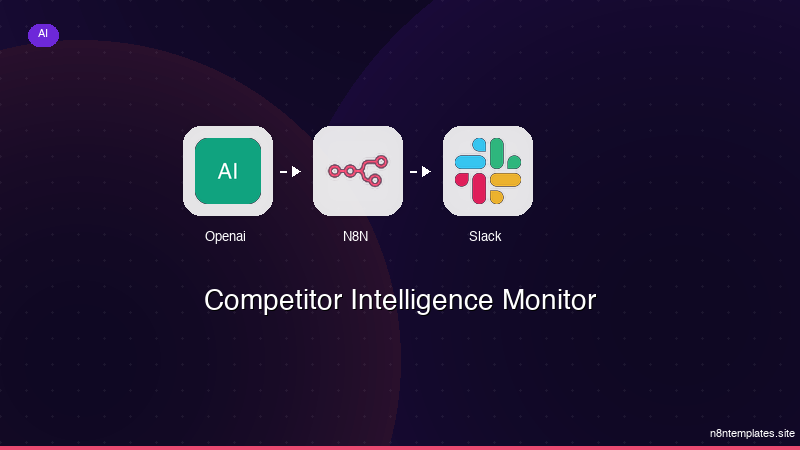
Nao comece do zero. O Competitor Intelligence Monitor e um workflow n8n pronto para instalar que faz exatamente isso — em minutos, nao horas.
Instalar por $59 →

